1. vue改nvue
1.1 html
1.1.1 文本
<!-- 必须在text标签内,且部分样式也只在text标签上生效 -->
<text class="label">文本</text>
/* color和fontSize只在text标签中生效 */
/* 如果需要换行,必须指定width */
.label {
color: white;
font-size: 38rpx;
}1.1.2 :style传参
<view class="btn" :style="btnStyle">
  <!-- XXXX -->
</view>
// btn的样式 (这种写法兼容nvue)
const btnStyle = computed(() => {
  const propsKeys = ['width', 'height', 'border', 'borderRadius', 'margin']
  const styles: any = {}
  propsKeys.forEach((key) => {
    if (props[key]) {
      styles[key] = props[key]
    }
  })
  return styles
})
1.1.3 页面高度
<view class="pageContainer" :style="{ height: `${pageData.windowHeight}px` }">
  <!-- XXXX -->
</view>
onLoad(() => {
const { windowHeight } = uni.getSystemInfoSync();
pageData.windowHeight = windowHeight
})1.2 CSS
1.2.1 默认的
view {
  /* 默认column: 建议都指定flex-direction的值,便于同时兼容nvue和vue */
  display: flex;
  flex-direction: column;

  /* 默认border-box: 建议padding改用margin */
  box-sizing: border-box;
}
1.2.2 不支持的
view {
  /* 1.不支持百分比、vw、vh、rem */
  width: 100%;

  /* 2.不支持background渐变 */
  background: linear-gradient(327deg, #FF760A 0%, #FFB262 100%);


  /* 不支持gap */
  /* 不支持deep */
  /* 不支持flex-shrink、flex-basis、align-content */
  /* 不支持word-wrap部分属性 */
  /* 不支持box-sizing的设置,有默认值 */
}
1.2.3 支持的
view {
  /* 1.支持rpx、px */
  width: 100px;

  /* 2.支持background-image渐变 */
  background-image: linear-gradient(to right, #53576B, #707485);
  /* 2.支持background-color */
  background-color: #e7e7e7;
}
1.3 js
1.3.1 支持的
uni.$emit('eventName', 'XXX')
uni.$on('eventName', () => {})
uni.$off('eventName')
1.3.2 其它
@touchmove返回event,nvue使用screenX/screenY,vue使用clientX/clientY
2. nvue和vue如何共享变量
nvue和vue的内存是不共享的,即时定义了全局变量,引入的时候会各自初始化一份。
定时器也是一样,比如vue定义了一个定时器,id=1,在nvue调用clearInterval(1),是无法清除的
2.1 通过globalData共享内存
2.1.1 安装依赖
npm i vuex2.1.2 添加文件
src/store/index.ts
import { createStore } from 'vuex'
import globalDialog from './modules/globalDialog'

const store = createStore({
  modules: { globalDialog }
})

export default store
src/store/modules/globalDialog.ts
// 定义state
export const state = {
  oddMode: 'hide',
}

//定义actions
export const actions = {}

//定义mutations
export const mutations = {
  setOddMode(state, v) {
    state.oddMode = v
  }
}

//定义getters
export const getters = {
  getOddMode(state) {
    return state.oddMode
  }
}

export default {
  namespaced: true,
  state,
  mutations,
  actions,
  getters
}
src/store/useStore.ts
import { ref } from 'vue'

let store = ref(null)
let timer = null

export const useStore = () => {
  const getAppStoreSafely = () => {
    const app = getApp({allowDefault: true})
    if (app && app.globalData) {
      return app.globalData.store
    }
    console.log('App instance not ready yet')
    return null
  }

  if (!store?.value && !timer) {
    store.value = getAppStoreSafely()

    timer = setInterval(() => {
      store.value = getAppStoreSafely()
      if (store.value) {
        clearInterval(timer)
      }
    }, 50)
  } else if (store?.value) {
    clearInterval(timer)
  }
  return store
}
src/main.ts
import { createSSRApp } from 'vue'
import Vuex from 'vuex'
import App from './App.vue'

import store from '@/store'

export function createApp () {
  const app = createSSRApp(App)
  app.use(store)

  return {
    app,
    Vuex
  }
}
src/App.vue
<script lang="ts">
import store from '@/store'

// 挂载到globalData来共享内存
export default {
  globalData: { store }
}
</script>
src/xxx.vue 组件使用
<script lang="ts" setup>
import { useStore } from '@/store/useStore'

/**
 * 公用变量
 */
const store = useStore()
const aaa = computed(() => (store.value?.getters['xxxModule/getAAA']))

function show () {
  store.value.commit('xxxModule/setAAA', true)
}
</script>
2.2 通过Storage共享内存
uni.getStorageSync('token')
uni.setStorageSync('token', 'xxx')
uni.removeStorageSync('token')
3. 调整原生插件代码
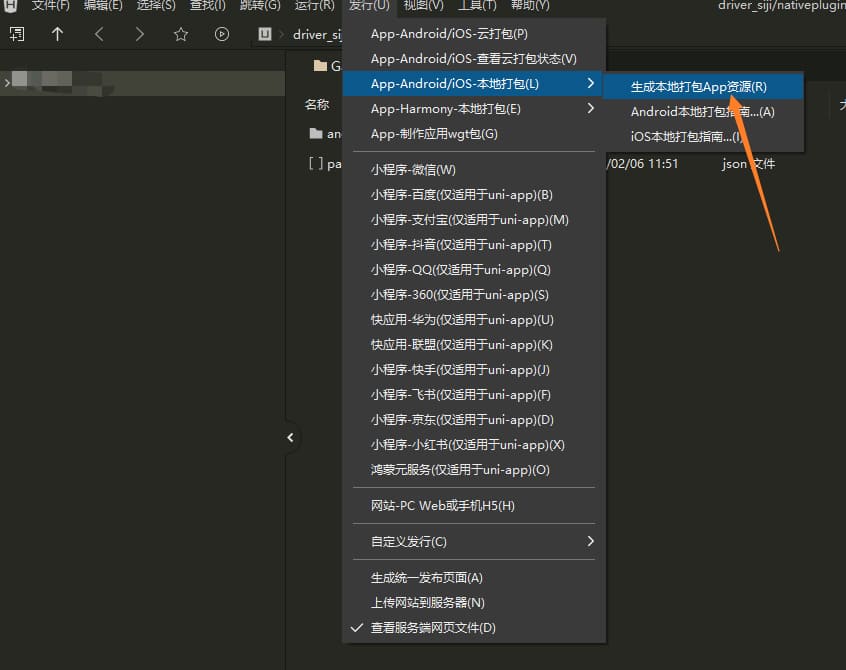
3.1 前端打包
编写好插件所需的代码后打离线包
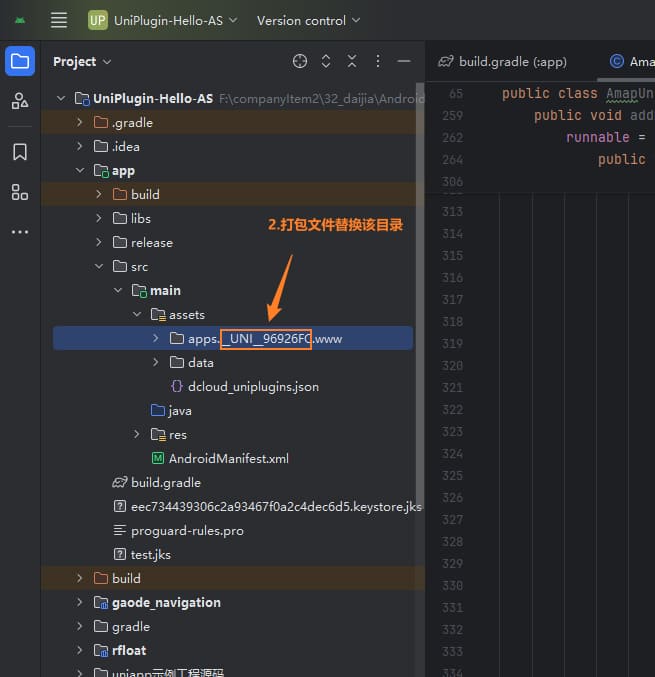
3.2 打包文件放到AndroidStudio
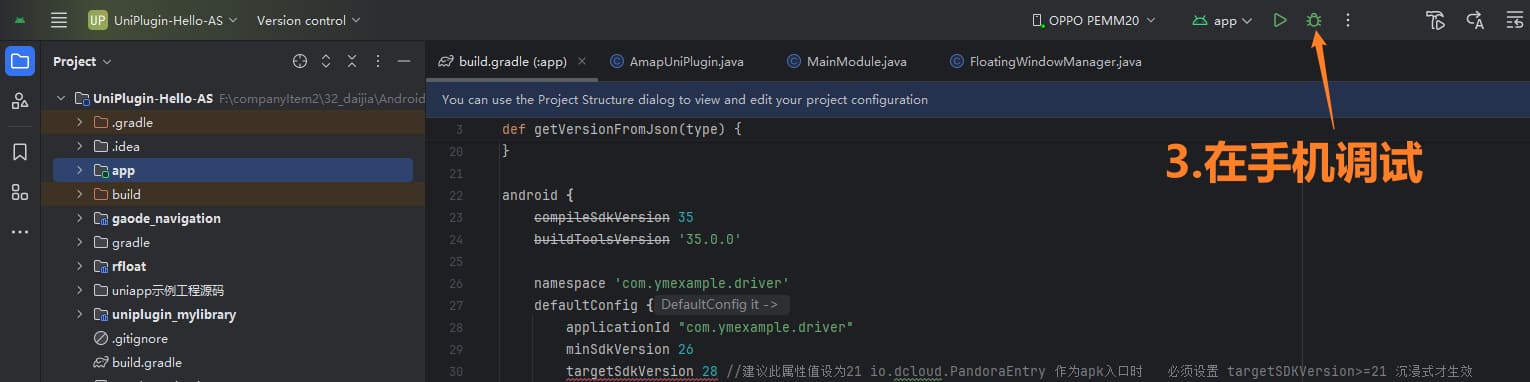
3.3 AndroidStudio调试
3.4 AndroidStudio打包aar
进入根目录

// Debug构建
./gradlew :mylibrary:assembleDebug

// Release 构建
./gradlew :mylibrary:assembleRelease
3.5 将aar替换到前端项目中
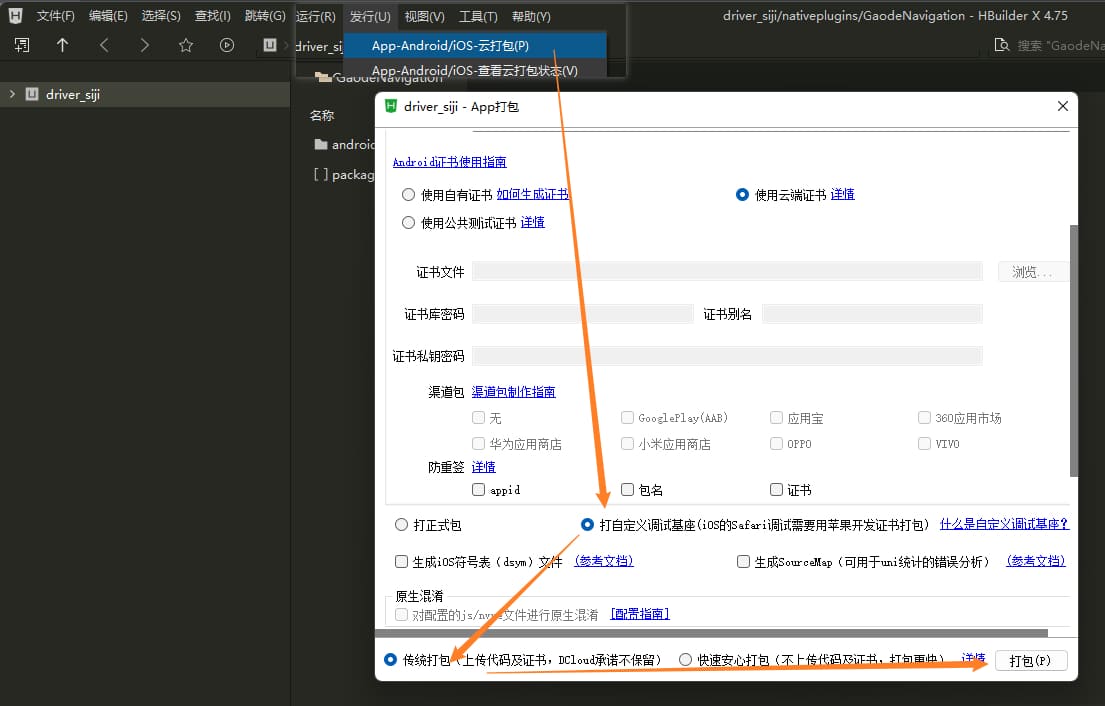
3.6 HBuildX打包基座
99.其它组件重写
99.1 弹窗(重写版本)
<uni-popup ref="popupRef" :mask-click="false">
</uni-popup>

const popupRef = ref()
function show ()
  popupRef.value.open('bottom')
}
99.2 uni-badge数字角标(重写版本)
<view class="badgeWrapper">
  <view class="mainContent">
    <image class="content" src="/static/home/message2.png" />
  </view>
  <view v-if="messageModel.unReadCount" class="badgeDot">
    <text class="badgeText">{{ messageModel.unReadCount <= 99 ? messageModel.unReadCount : '99+' }}</text>
  </view>
</view>
.badgeWrapper {
width: 100rpx;
height: 80rpx;
.mainContent {
width: 100rpx;
height: 80rpx;
justify-content: center;
align-items: center;
.content {
width: 36rpx;
height: 26rpx;
margin-right: 20rpx;
}
}
.badgeDot {
padding: 4rpx 10rpx;
border-radius: 20rpx;
border: 2rpx solid #ffffff;
background-color: #ff4d4f;
position: absolute;
left: 40rpx;
top: 4rpx;
.badgeText {
color: #ffffff;
font-size: 20rpx;
}
}
}